
- 1. Field - chọn type thế nào?
- 2. publish_state ≠ status
- 3. Ví dụ BĐS - thiết kế dữ liệu
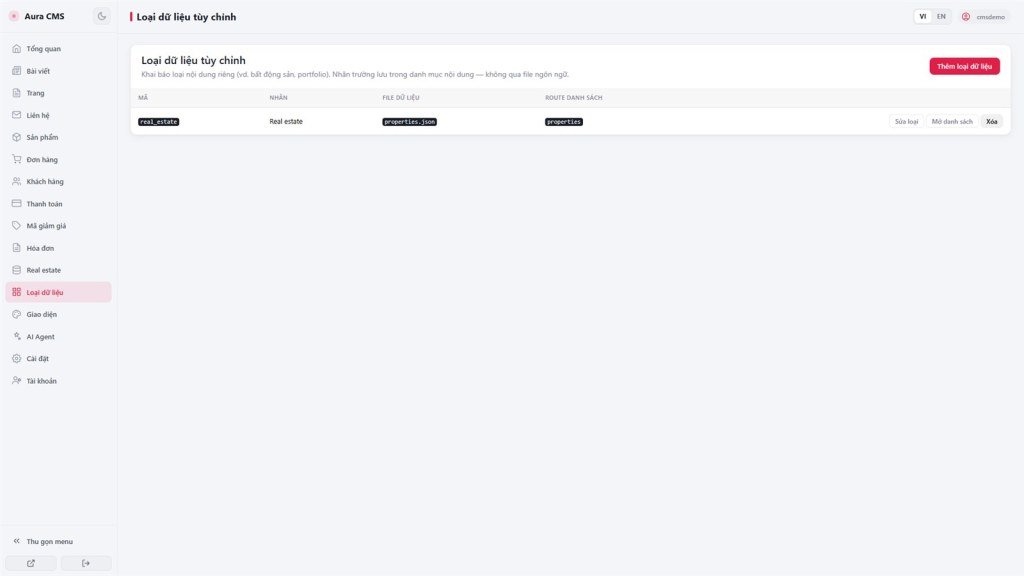
- 3.1 Điền trên Panel (sao chép)
- 3.2 Panel Lưu xong - hệ thống làm gì?
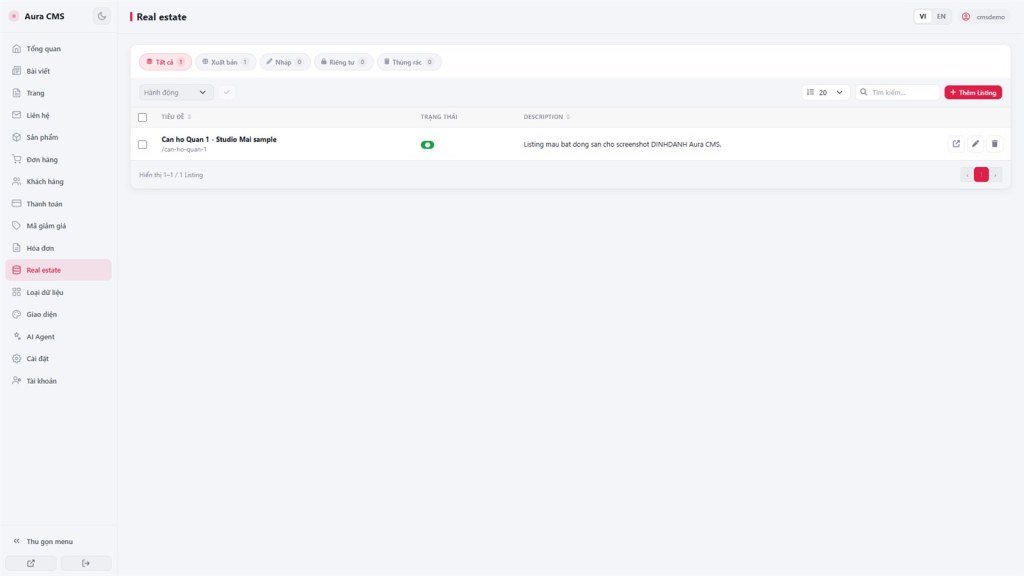
- 3.3 Việc bạn làm trong CMS
- 4. Hook HTML cần giữ
- 5. AI sửa code gì? (sau khi đã Lưu kiểu)
- 6. Prompt mẫu nhờ AI
- 7. Checklist BĐS
- 8. Vấn đề thường gặp
DINHDANH Creator · Bài AS20 · Custom types · Ví dụ BĐS
Panel Lưu · field · taxonomy · website BĐS
Khai báo trên Panel để CMS tự cập nhật hai file khai báo đúng chuẩn - rồi nhờ AI làm đẹp trang list/detail và bộ lọc.
Mục tiêu: Tạo kiểu properties, chọn type field đúng, bật danh mục; biết Panel tạo những gì; nhờ AI chỉnh HTML an toàn.
Điều kiện: AS19 · AS07 · Backend Advanced + CMS
Prompt: Aura Complete + DINHDANH Aura CMS + Storage - Complete AI Guide · Bài liên quan: AS21 (AI tự khai báo)
1. Field - chọn type thế nào?
| type | Widget | Dùng khi |
|---|---|---|
string | text | Tiêu đề, địa chỉ ngắn |
text | textarea | Đoạn dài không cần HTML |
html | textarea / wysiwyg | Mô tả có định dạng |
number | number | Giá, m², số phòng |
enum | select | Tập cố định: bán / thuê |
boolean | toggle | Có / không |
url | url | Link ngoài |
image | image | Ảnh bìa (upload trong CMS) |
ref / array / datetime trên form kiểu tùy chỉnh. Nhiều loại hình BĐS → bật Danh mục. Chỉ vài giá trị cố định → enum.2. publish_state ≠ status
Kiểu tùy chỉnh dùng trường hệ thống publish_state (draft / published / private / trash) để hiện trang khách. Blog sẵn dùng status.
Field tự đặt tên status (vd. “đã bán”) là field riêng - không thay publish_state. Panel không đưa id / slug / ngày giờ vào danh sách field bạn khai báo (hệ thống tự gắn khi lưu tin).
3. Ví dụ BĐS - thiết kế dữ liệu
| Nhu cầu | Cách khai báo |
|---|---|
| Danh sách tin BĐS | Mã kiểu properties · data_file: properties.json |
| Bán / Cho thuê | listing_type · enum: sale, rent |
| Căn hộ, đất, chung cư… | Bật Danh mục → thường properties-categories.json |
| Giá, diện tích, phòng | price, area_m2, bedrooms · number |
| Mô tả / ảnh | description html · cover_image image |
3.1 Điền trên Panel (sao chép)
Nhãn: Bất động sản
File dữ liệu: properties.json
Route list: properties → properties/index.html
Route detail: properties/{slug} → properties/detail.html
✓ Bật danh mục (categories)
Fields:
title (string, bắt buộc)
description (html)
listing_type (enum: sale, rent) bắt buộc
price · area_m2 · bedrooms · bathrooms (number)
address · city (string)
cover_image (image)
Không dùng mã dành sẵn: posts, products, pages, contacts, orders, blog, shop, cart…
3.2 Panel Lưu xong - hệ thống làm gì?
(Giống thứ tự tài liệu AI - bạn không cần làm tay nếu đã Lưu trên Panel.)
- Cập nhật
__cms_manifest__.json(entityproperties+ entity ẩn danh mục nếu bật) - Cập nhật
__cms_ui_contract__.json(khóade_properties_list/detail/ … + hook#de-item-list) - Tạo HTML mẫu:
properties/index.html,detail.html, (có thể)category.html - Gắn route danh sách công khai
- Menu
/cmsxuất hiện mục Bất động sản
File dữ liệu tin (properties.json) thường được tạo khi thêm tin đầu tiên - không bắt buộc có sẵn lúc Lưu kiểu.
3.3 Việc bạn làm trong CMS
- Danh mục: Căn hộ, Chung cư, Nhà phố, Đất nền…
- Thêm tin: hình thức bán/thuê, danh mục, giá, ảnh…
- Đặt
publish_state= published để hiện ngoài site
4. Hook HTML cần giữ
- Danh sách:
#de-item-list· body códata-aura-cms-rootvàdata-aura-cms-entity="properties" - Chi tiết:
#de-item-detail - Trang danh mục (nếu có):
#de-tax-item-list
5. AI sửa code gì? (sau khi đã Lưu kiểu)
Sửa: HTML/JS trang site (properties/index.html, detail.html) - lưới, lọc bán/thuê, lọc loại hình, card giá.
Không sửa: giao diện quản trị /cms của nền tảng.
await window.waitForAppStorage();

const mRes = await appifio_client.appifio_readFsFile('__cms_manifest__.json');
let manifest = mRes.data.content;
if (typeof manifest === 'string') manifest = JSON.parse(manifest);

const ent = manifest.entities.properties;
const dataFile = ent.data_file;

const r = await appifio_client.appifio_readList(
  dataFile,
  ['id','title','slug','listing_type','price','area_m2','city','cover_image','publish_state','category_id']
);
let items = (r.data.content || []).filter(p => p.publish_state === 'published');
// items = items.filter(p => p.listing_type === 'rent');

const catFile = ent.taxonomy?.categories?.data_file;
const cats = catFile
  ? (await appifio_client.appifio_readList(catFile, ['id','name','slug'])).data.content || []
: [];JSON.parse lại sau readList; lọc bằng status; hardcode tên file; writeFile cả sổ trên trang khách; xóa hook #de-item-list.6. Prompt mẫu nhờ AI
Sau Panel Lưu (khuyến nghị):
“CMS đã có kiểu properties (đã Lưu trên Panel). Đọc __cms_manifest__.json và __cms_ui_contract__.json, chỉnh properties/index.html + detail.html: lưới tin, lọc Bán/Thuê (listing_type), lọc loại hình (category_id), chỉ hiện publish_state === published. Giữ hook #de-item-list / #de-item-detail. Không dùng Easy.”
Muốn AI tự tạo kiểu (không Panel): xem AS21 - phải merge đúng hai file khai báo giống Panel.
7. Checklist BĐS
- CMS + Advanced + Prompt Aura (+ CMS guide)
- Panel: tạo
properties+ field mục 3.1 + bật danh mục → Lưu - Thêm danh mục + vài tin (published)
- Nhờ AI chỉnh HTML (prompt mục 6)
- Kiểm URL list/detail + bộ lọc + hook còn nguyên
- Không bật Prompt Easy
8. Vấn đề thường gặp
| Tình huống | Xử lý |
|---|---|
Không tạo được mã posts / products… | Mã dành sẵn - đổi tên (vd. properties) |
| Có tin CMS nhưng list trống | Kiểm publish_state (không dùng status); đọc đúng data_file từ manifest |
| Layout đẹp rồi CMS inject hỏng | Khôi phục #de-item-list / #de-item-detail và body attrs |
Tiếp theo
AS21 - AI tự khai báo kiểu: merge manifest + UI contract giống Panel
Điều hướng nội bộ (cùng ngôn ngữ)
DINHDANH Creator · AS20 · Custom types · Real estate
